


Executive Summary
The new Polish SAF-T (JPK_V7) framework mandates precise transaction classification, requiring businesses to apply specific GTU codes to sales of sensitive goods and procedural flags (e.g., for split payments or related-party transactions) across both sales and purchases. Compliance relies heavily on accurate ERP master data mapping, as the system enforces strict validations that reject incorrect filings. Looking ahead to 2026, the regime will tighten further with the introduction of JPK_V7(3), which integrates SAF-T with the mandatory KSeF e-invoicing system, making data consistency between e-invoices and tax reports critical for avoiding penalties.
Poland’s VAT SAF‑T (JPK_V7M/JPK_V7K) requires GTU codes on qualifying sales lines and procedure flags (e.g., TP, EE, MPP, TT_WNT/TT_D, MR_T/MR_UZ, I_42/I_63, B_SPV/B_MPV). Purchases never use GTU but may require flags (e.g., MPP). In 2026, JPK_V7(3) will link SAF‑T with KSeF, so store KSeF IDs with classification and run pre‑submission validations.
SAF‑T structure overview
What it is: Poland replaced separate VAT returns and VAT records with one XML file: JPK_V7M (monthly) or JPK_V7K (quarterly).
Each file contains:
- Header (period and entity identifiers),
- Declaration (the VAT return),
- Records (sales and purchases at entry level with required attributes).
Why classification matters: Rejections and audit queries typically originate from missing/wrong GTU on sales, omitted flags (e.g., TP/EE/MPP), and inconsistent corrections. Classification must be traceable from item master data to the JPK export.
New SAF‑T requirements — where Poland is heading (JPK_V7(3) & KSeF)
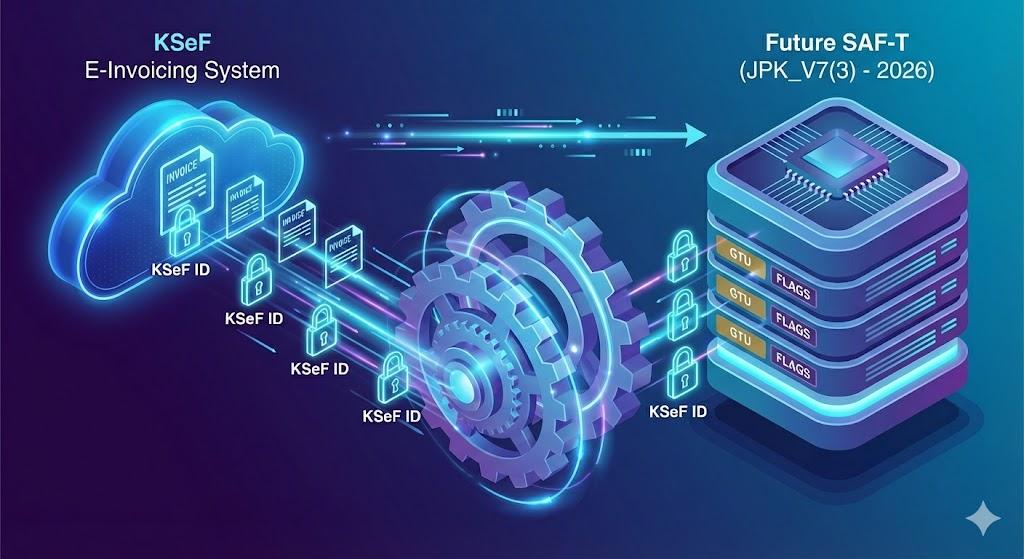
Context: The Ministry of Finance announced JPK_V7(3) to synchronize SAF‑T with mandatory KSeF e‑invoicing (from 1 Feb 2026). Practically, expect:
- KSeF identifiers/markers in the records (sales and purchases),
- Stricter validations (schema + business rules) linking e‑invoice data and SAF‑T entries,
- The need to store KSeF number and status next to classification attributes inside your ERP.
Takeaway: build a single source for invoices (KSeF number, buyer/seller, items) and classification fields (GTU and flags). This reduces mismatches between e‑invoices and JPK.
SAF‑T categories and codes — GTU codes in SAF‑T (quick map)
Scope:GTU codes identify sensitive goods/services and are reported only on sales where applicable. Typical groups include fuels, electronics, medicines/medical devices, metals/waste, alcohol/tobacco, real estate, intangible and transport services (exact legal scopes derive from VAT regulations and MF guidance).
Working rules:
- Classify at item level (CN/PKWiU references in your master data) and roll up to invoice level.
- Multiple GTU allowed per invoice — include all that apply to the items actually supplied.
- Never use GTU on purchases.
- If unsure, document the basis (CN code, binding ruling where relevant) and keep it with your audit files.
Example: An invoice with laptops (electronics) and installation services may require two GTU codes on the same sales document. Credit notes mirror the original classification for the corrected scope only.
Procedure flags — SAF‑T categories and codes beyond GTU
Procedure flags describe the nature of a transaction and may apply to sales and/or purchases:
- TP — related‑party transactions (transfer pricing angle),
- EE — cross‑border B2C supplies of services/distance sales within the EU,
- SW — mail‑order supplies from Poland (legacy; use if still relevant to your flow),
- TT_WNT / TT_D — triangular intra‑EU chain supplies (acquisition/delivery legs),
- MR_T / MR_UZ — VAT margin schemes (tour operators / second‑hand goods),
- I_42 / I_63 — import followed by intra‑EU supply (customs procedure linkage),
- B_SPV / B_MPV — platform economy patterns (single/multiple),
- MPP — split payment mechanism (can appear on sales and purchases when mandatory or used).
Note: Flags are not mutually exclusive. Apply all that fit the legal profile of the transaction.
How to classify invoices — how to classify invoices in practice (coding sales and purchases)
Coding sales (output VAT)
- Start at line level: map each item/service to a potential GTU using CN/PKWiU data.
- Add procedure flags: determine TP/EE/TT_WNT/TT_D/MR_/I_42/I_63/B_/MPP based on flow, counterparty and tax treatment.
- Advances: classify in line with the final supply; ensure consistency between advance and clearing documents.
- Corrections (credit/debit notes): mirror the original GTU and flags but only for corrected lines/amounts.
Coding purchases (input VAT)
- No GTU is reported. Apply flags where applicable (e.g., MPP on invoices covered by mandatory split payment or where used voluntarily).
- For imports/intra‑EU acquisitions: ensure the relevant fields (e.g., customs procedure numbers, intra‑EU indicators) are filled in line with JPK rules.
- For reverse charge cases: reflect the correct treatment in records and declaration.
Common pitfalls (what to avoid)
- Single GTU for mixed invoices: wrong. Report all relevant GTU appearing on the invoice.
- Ignoring platform flags (B_SPV/B_MPV): assess marketplace roles carefully.
- Misusing margin flags (MR_T/MR_UZ): only when the margin scheme truly applies.
- Untracked master‑data changes: keep CN/PKWiU and GTU mapping under change control.
SAF‑T reporting obligations — validations and corrections
- Frequency: JPK_V7M monthly / JPK_V7K quarterly (with monthly records part for K taxpayers).
- Technical validation: schema version, mandatory fields (identifiers, flags), value formats; files with missing required tags may be rejected.
- Corrections (amendments): send only the changed sections (declaration or records) with a correct header for the period.
- Audit documentation: keep a classification memo, item mapping (CN/PKWiU → GTU), and rationale for flags. This speeds up audits and supports amendments.
Changes in Polish SAF‑T to watch (2025 → 2026)
- KSeF becomes mandatory; JPK_V7(3) aligns SAF‑T with structured e‑invoicing.
- KSeF numbers/markers will be standard in both sales and purchase records.
- Expect tighter cross‑checks between the e‑invoice and JPK exports.
Action point: plan a data migration to retro‑store and expose KSeF IDs for all relevant documents alongside GTU/flags.
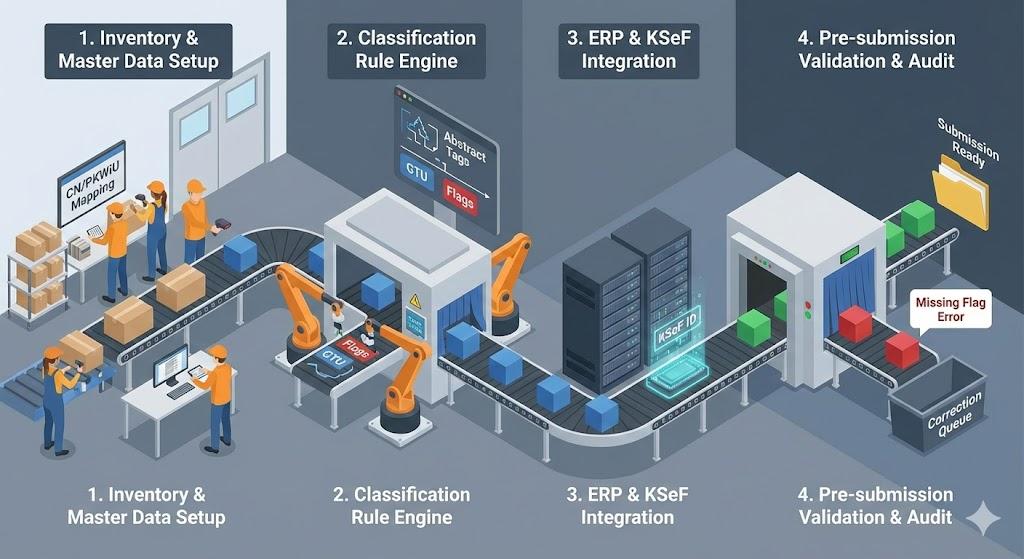
SAF‑T compliance guide — 7 steps to get ready
- Inventory your flows: domestic/EU/third countries; B2B/B2C; platform economy; related parties.
- Master‑data cleanse: attach CN/PKWiU and GTU eligibility to items; mark services where no GTU applies.
- Rule engine for flags: codify scenarios for TP, EE, TT_WNT/TT_D, MR_, I_42/I_63, B_, MPP.
- ERP ↔ KSeF integration: store KSeF number/status on every invoice; surface them to the JPK export.
- Pre‑submission checks: run schema + business validations before sending JPK; block submission on critical errors.
- Controls & audit folder: keep mapping tables, examples, and approvals; update when law or product portfolio changes.
- Training & monitoring: train accounting/AR/AP teams; monitor rejections and fix root causes.

FAQ — transaction classification for SAF‑T in Poland
Do GTU codes apply to purchases?
No. GTU are sales‑only; purchases may carry procedure flags (e.g., MPP) and other required fields.
How many GTU codes can one invoice have?
As many as needed. Assign all that apply to the items on the invoice.
When do I use MPP?
When mandatory by law for specific goods/services and thresholds, or when voluntarily used; it may tag both sales and purchases.
What changes with JPK_V7(3)?
Expect KSeF fields/markers, stricter validations, and closer linkage between e‑invoice data and SAF‑T records from 1 Feb 2026.
Related services & guides: